Showing posts with label software. Show all posts

Saturday, January 9, 2021

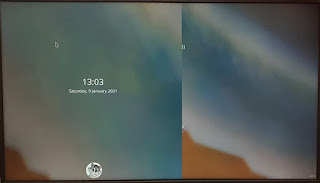
Displays overlapping on Kubuntu 20.04 on Asus ZenBook with Nvidia GPU

The problem ScreenXpert overlaps the main screen when Nvidia MX250 is chosen as main graphics card. The same thing doesn't happen with Intel graphics as primary card.

The solution is to disable the ScreenXpert monitor before the welcome screen loads.

The first step will be to find the name of the ScreenXpert monitor. In order to do it, run the following command:

xrandr --query

In the output find the monitor with only two resolutions:

HDMI-2 connected (normal left inverted right x axis y axis)
1080x2160 50.03 +
504x1000 50.03


HDMI-2 is what we are looking for.

After having found the monitor name we need to edit the file
/usr/share/sddm/scripts/Xsetup
and add the following line at its end:

xrandr --output HDMI-2 --off

Source: https://www.reddit.com/r/kde/comments/755q9a/sddm_and_triple_monitors.

Running Zenmap on Ubuntu 20.04

  1. Download Zenmap packages and convert rpm packages to deb as described here.
  2. Install python 2.x by running

    sudo apt-get install python

    If you try to run Zenmap now, you'll get the following error:

    Could not import the zenmapGUI.App module: 'No module named gtk'
  3. Download the following packages from Debian repositories:
  4. Install python-gobject-2, then python-cairo and then python-gtk2.

    You may need to fix dependency problems by running

    sudo apt --fix-broken install.

  5. Enjoy Zenmap!

Saturday, May 30, 2020

How to install Chirp on Ubuntu 20.04 Focal Fossa

The solution was proposed by Ephraim Gariguez DW1ZWS in his post How to install Chirp on Ubuntu 20.04.

What is the problem?

Chirp installation on Ubuntu is done requires the following commands sequence:

sudo apt-add-repository ppa:dansmith/chirp-snapshots
sudo apt-get update
sudo apt-get install chirp-daily


When you try to install Chirp on Ubuntu 20.04, you get the following output:

Reading package lists... Done
Building dependency tree
Reading state information... Done
E: Unable to locate package chirp-daily


The solution


  1. Edit the /etc/apt/sources.list.d/dansmith-ubuntu-chirp-snapsots-focal.list and change the Ubuntu release from fossa to to xenial.
     
  2. Try to install Chirp again by running the following commands:

    sudo apt-get update
    sudo apt-get install chirp-daily


    This will result in dependencies error:

    The following packages have unmet dependencies:
    chirp-daily : Depends: python-libxslt1 but it is not installable
    Depends: python-gtk2 but it is not installable
    Depends: python-serial but it is not installable
    Depends: python-suds but it is not installable
    E: Unable to correct problems, you have held broken packages.

     
  3. Download DEB packages from https://drive.google.com/open?id=1irLlhwTVlC8wO9OhSt3-9j943CyimhmM and install them manually.
     
  4. Add yourself to dialout users group by running:

    sudo usermod -aG dialout $USER
  5. Install Chirp by running:

    sudo apt-get install chirp-daily

Displays overlapping on Kubuntu 20.04 on Asus ZenBook with Nvidia GPU

The problem ScreenXpert overlaps the main screen when Nvidia MX250 is chosen as main graphics card. The same thing doesn't happen with I...